The Navigation App Every New CDL Holder Should Know About
You just earned your CDL. You’ve got your Class A license, a carrier lined up, and a route ahead of you. Now what?
One of the first things experienced drivers will tell you is that your phone—and the apps on it—matter more than most new drivers expect. Google Maps might get you lost under a bridge. A standard GPS won’t warn you about weight restrictions on certain roads. And there’s nothing quite like rolling up to a weigh station that’s been closed for hours while you sat in a detour that a better app would have flagged.
This is where Trucker Guide comes in. Keep reading to find out why it deserves a spot on every new driver’s phone.
Built for Trucks, Not Cars
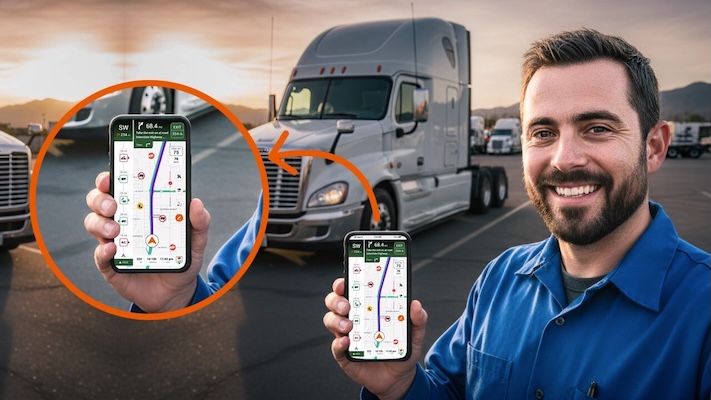
Trucker Guide is a navigation platform built specifically for commercial drivers. That distinction matters more than it might seem. The app accounts for your truck’s dimensions—height, width, weight, and length—and uses that information to route you around low clearances, weight-restricted roads, and no-truck zones before you ever get close to them.
For a new driver, that’s not just a convenience. That’s protection. One wrong bridge can damage your cargo, your rig, and your record. One restricted road can cost you hours of backtracking and a very uncomfortable conversation with dispatch.
The app is available free on both iOS and Android, holding a 4.8 out of 5 star rating in Apple’s App Store and a 4.4 out of 5 rating in the Google Play Store. It covers over 450,000 points of interest for truck drivers across the United States, with growing coverage in Canada.
What It Actually Does on the Road
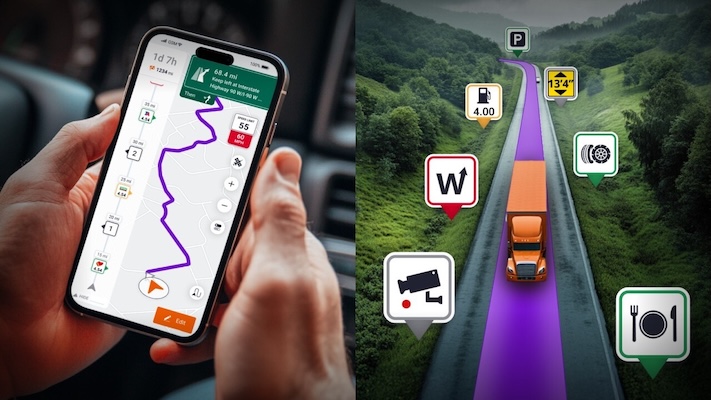
Trucker Guide’s navigation goes well beyond getting from point A to point B. Here’s a closer look at what drivers are actually using it for day to day.
- Truck-specific routing. When you enter your truck’s dimensions—height, weight, width, length—the app adjusts your entire route accordingly. It avoids low clearances, weight-restricted roads, no-truck zones, and areas where your rig simply doesn’t fit. You can also customize it to avoid tolls, ferries, tunnels, unpaved roads, or carpool lanes. Hazmat haulers can input their cargo classifications for routes tailored to those requirements too.
- Low clearance alerts. The app maintains detailed bridge and tunnel clearance data and flags anything that could be a problem for your specific rig. This is one of the most critical features for new drivers who aren’t yet familiar with their regular routes. A missed bridge height warning can turn a routine delivery into a serious incident.
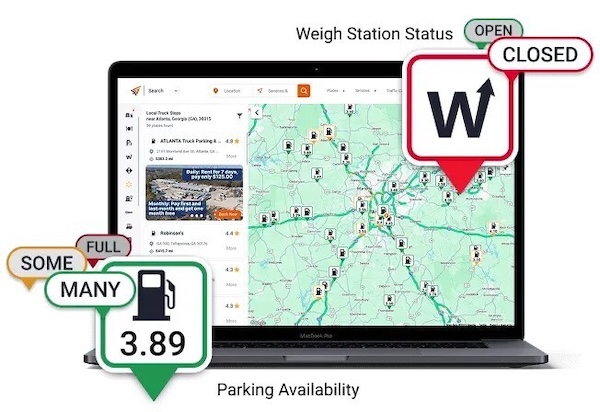
- Weigh station status updates. Real-time data tells you whether stations ahead are open or closed. That means no more pulling off unnecessarily, and no surprises when you’re already behind schedule. You can plan your trip knowing what’s ahead rather than finding out at the last second.
- Live traffic cameras. With access to over 14,000 live road cameras, you can see actual traffic conditions—not just algorithmically estimated delays—before you commit to a route. If there’s a jackknifed semi blocking I-75 thirty miles ahead, you’ll see it in time to make a decision.
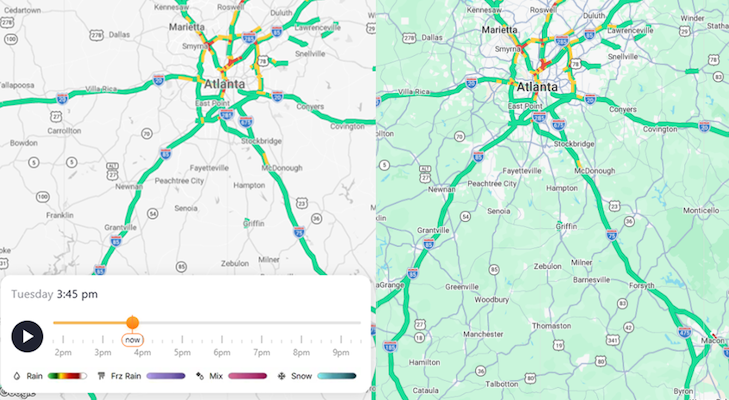
- Weather radar. See a live radar of weather across the U.S. with a timeline showing how it will change over the course of the day. Anticipate rain, freezing rain, mixed precipitation, snow, and more to help you make informed decisions about your routes.
- Real-time parking availability. The app shows live parking status at truck stops, rest areas, and public lots. For drivers managing HOS compliance, knowing there’s an open spot waiting before you need it can be the difference between a smooth day and a compliance headache. Anyone who’s pulled into a packed Flying J at 10 p.m. knows exactly why this feature matters.
- Fuel locating and diesel prices. Find Pilot Flying J, Love’s, TA/Petro, and local stops along your route. Real-time diesel prices let you compare stations and make smarter fueling decisions before you pull in. Over a full week of driving, those per-gallon differences add up.
- Real-time ETA updates. The app adjusts your estimated arrival time based on current road conditions. Dispatch doesn’t love surprises, and neither do receivers. Having accurate ETAs means fewer awkward phone calls and more confidence in your schedule.
- A status bar with nearby updates. As you drive, the app surfaces relevant information about what’s coming up—fuel stops, rest areas, weigh station statuses, and nearby services—without you having to search for it manually.
More Than a GPS
Trucker Guide also works as a directory for everything drivers need when they’re away from home. Truck washes, repair shops, tire shops, urgent care or health clinics, DOT exam locations, truck parts stores, oil and lube services, trailer repair—it’s all searchable by your current location or anywhere along your route.
If you’re hauling through an unfamiliar area and something goes wrong, having that directory already on your phone means you’re not scrambling across three different apps trying to find a 24-hour mobile repair service. The app covers road assistance categories including mobile repairs, tire repairs, and towing. It also lists scales, Walmart locations, hotels, cross-docking facilities, truck yards, and CDL schools like TDI—which is useful if you’re helping someone else start the process of getting licensed.
For owner-operators managing their own equipment, the app also lists truck and trailer dealers by brand across the country, including Peterbilt, Freightliner, Kenworth, Volvo, and more.
The 3D Map and Recent Updates
Trucker Guide has been actively improving the app based on driver feedback. The latest updates include a faster, more responsive navigation experience—quicker route launches, smoother screen transitions, and faster recalculations when you need to reroute on the fly. Performance improvements are especially noticeable in areas with weak signals, which matters for drivers running through rural stretches with spotty coverage.
The 3D map tilt feature gives you a better visual sense of upcoming turns, ramps, and exits as they approach. Road labels, exit signs, and key points are larger and easier to read at a glance. The navigation notification bar was redesigned so your direction, compass heading, and next turn are easier to track without taking your eyes off the road longer than you should.
These aren’t flashy additions. They’re practical improvements that reflect what drivers actually asked for—and that’s what good trucking tools look like.
Getting Started
If you’re still in the process of getting your CDL, TDI can get you there in three weeks. Once you’re on the road, apps like Trucker Guide are part of what helps you stay there successfully. Learn more about TDI’s Class A CDL training classes here and Trucker Guide’s GPS navigation app here to put you on the path to a rewarding trucking career today.



Get Started
Get your Class A CDL in our friendly, supportive CDL training program. TRAIN with experienced instructors – multiple good-paying, secure job choices with benefits available for eligible graduates. EARN $700 – $1000+ / week to start as a truck driver. Get started today by filling out the form below. We look forward to hearing from you!